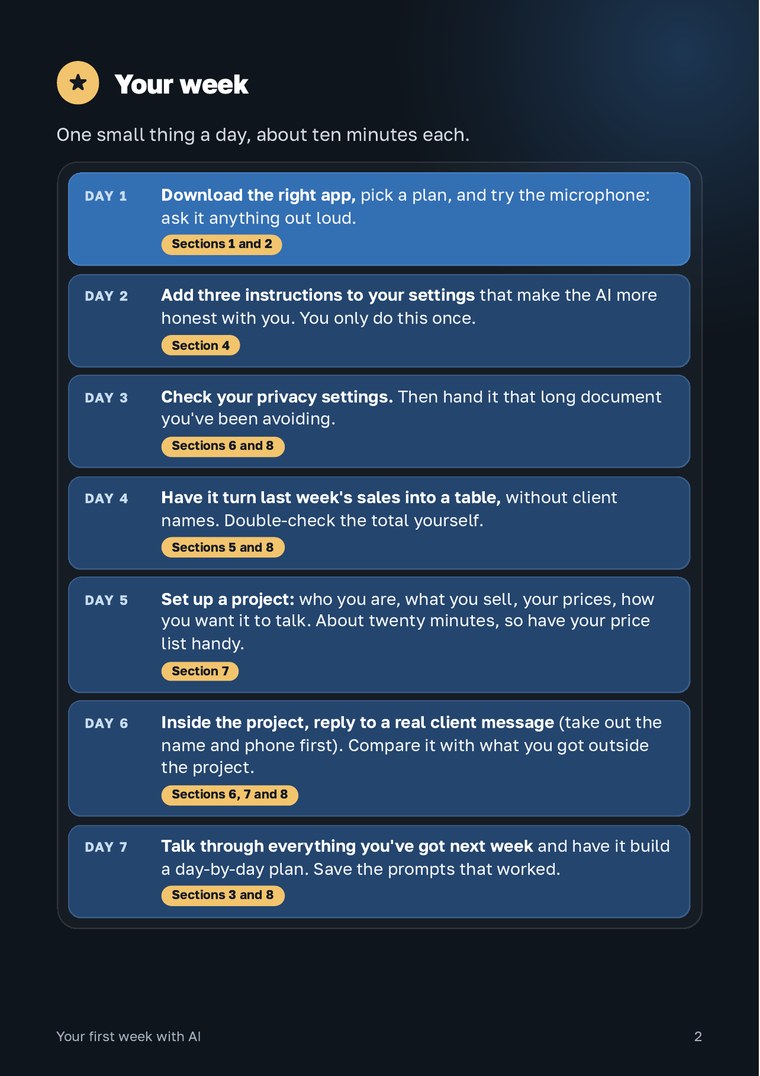
Your week
Download the right app, pick a plan, and try the microphone: ask it anything out loud.
Section 1Section 2Add three instructions to your settings that make the AI more honest with you. You only do this once.
Section 4Check your privacy settings. Then hand it that long document you've been avoiding.
Section 6Section 8Have it turn last week's sales into a table, without client names. Double-check the total yourself.
Section 5Section 8Set up a project: who you are, what you sell, your prices, and how you want it to talk. This one takes about twenty minutes, so have your price list handy.
Section 71The first ten minutes
Download the right app. App stores are full of lookalikes with almost the same name. Check the developer: Claude is made by Anthropic, ChatGPT by OpenAI, Gemini by Google.
Two buttons you'll use right away:
- The microphone in the message box. Tap it and just talk, the way you'd leave a voice note for a friend. No typing needed.
- The plus sign or paperclip next to it. Snap a photo of a document or attach a file.

The message box in Claude: the plus on the left, the microphone on the right. ChatGPT and Gemini have similar buttons.
Language. Write in whatever language you're most comfortable with. It replies in the same language.
Settings and projects are easier to set up on a computer, at claude.ai. On your phone, you'll find the same options in the menu under your name.
2Which AI to use, and is it worth paying for
My recommendation: Claude Pro, $20 a month ($17 a month if you pay yearly). It's what I use every day.
You can get through the first few days on the free plan. But the free plan has a message limit that goes up and down, and you only get five projects. If you use it daily, you'll run into that limit quickly. When you do, wait a couple of hours or switch to a different AI for a while. You can manage your plan under Settings → Billing.
Already using ChatGPT or Gemini? Most of this week works there too, and I'll point out where to find things in both. One catch: the free version of ChatGPT doesn't always give you a downloadable Word or Excel file. Sometimes you just get a table in the reply.
From here on, the examples use Claude.
3Four rules for better answers
Getting so-so answers? Usually the problem isn't the AI, it's how you're asking.
Give it context. Tell it who the answer is for and what you want back: a Word file, a table, five lines for WhatsApp. "Write something" isn't enough. Attach your own files and examples.
One task per chat. When you're done with something, open a fresh chat for whatever comes next. Long chats get messy.
Fix it instead of starting over. If the answer is off, say what's wrong in the same chat: "too long, cut it to five lines".
Save what works. When a prompt gets you a great result, keep it in your notes and reuse it next time.
4Three instructions that make the AI more honest
AI assistants are built to be helpful, so they jump straight into the task and tend to go along with whatever you say. They get more accurate and more honest when you ask them to. So ask for three things:
Before you answer, ask me any questions you need to.
Give me the strongest arguments for and against. Be straight with me and push back.
Show me what your answer is based on.
Add them to your settings once, and they'll apply to every conversation from then on. Here's the full text to copy:
Be honest with me, even if it's not what I want to hear. Don't just agree with me to be polite. Before you answer a complicated question, ask me any questions you need to. Give me the arguments for and against. Tell me what your answer is based on. If you're not sure, say so. Keep it short and use plain language.
Where to paste it:
- Claude: click your name in the bottom left, then Settings → Account → Instructions for Claude.
- ChatGPT: Settings → Personalization, turn on Enable customization, then fill in Custom instructions.
- Gemini: create a Gem with your own instructions (see section 7) and ask your questions there.
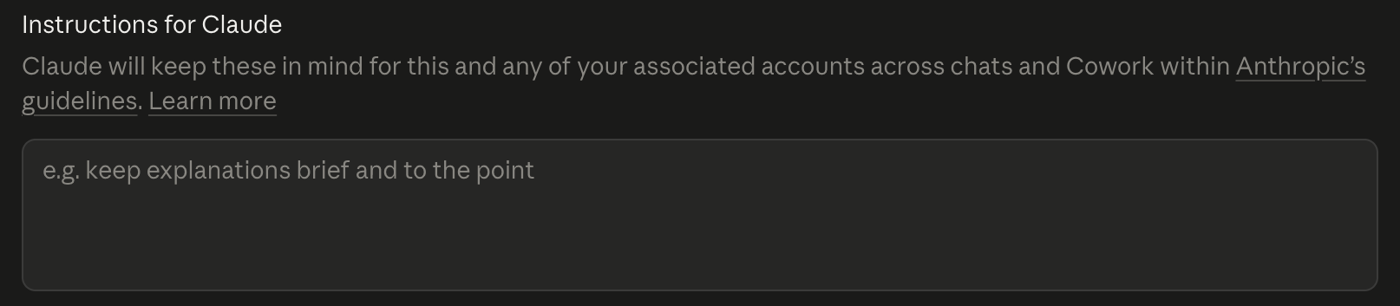
Claude: Settings, Account, the field Instructions for Claude.
5How to check an answer
The AI can sound completely sure of itself and still be wrong. It sometimes gets numbers wrong. And it may change its answer if you push back. So for anything important, ask:
Don't just ask "are you sure?". That tends to make it switch answers rather than double-check. And always check totals yourself. Checking a number is a lot faster than calculating it from scratch.
6What not to share with the AI
Don't treat the AI like a safe. A few simple rules:
Never paste passwords, card numbers or ID details.
Remove client details. Write "client A" instead of a name and phone number. The AI doesn't need them to write a reply or do the math.
Turn off training on your chats, so your conversations aren't used to improve the AI:
- Claude: Settings → Privacy, and make sure Help improve our AI models is switched off.
- ChatGPT: Settings → Data controls, and turn off Improve the model for everyone.
- Gemini: Settings & help → Activity, and turn activity saving off.
Health, legal and tax questions. The AI can help you understand the situation and prepare your questions. The final decision belongs with a professional.
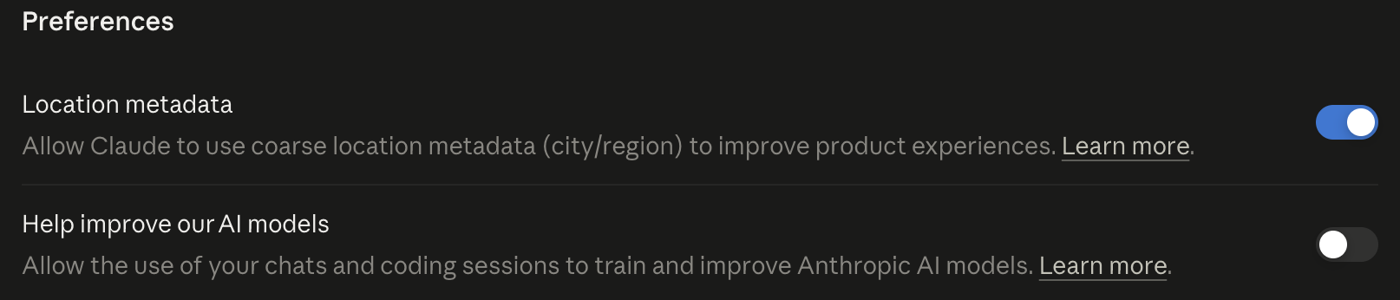
Claude: Settings, Privacy. The switch Help improve our AI models is off.
7Set up a project so the AI knows your business
A regular conversation starts from scratch every time. A project is like a folder for your business: you add the key information once, and every conversation inside it starts with that knowledge. Claude's free plan includes up to five projects.
How to set one up in Claude:
- Go to Projects on the left, then click New project in the top right. Give it a name, like "My business", and click Create project.
- On the right, find the Instructions box. Click the plus and paste the template below, filled in with your details.
- Below it, find the Context box. Click the plus and upload your files (see the list below).
- Start chatting right on the project page. Claude already knows your instructions and files.
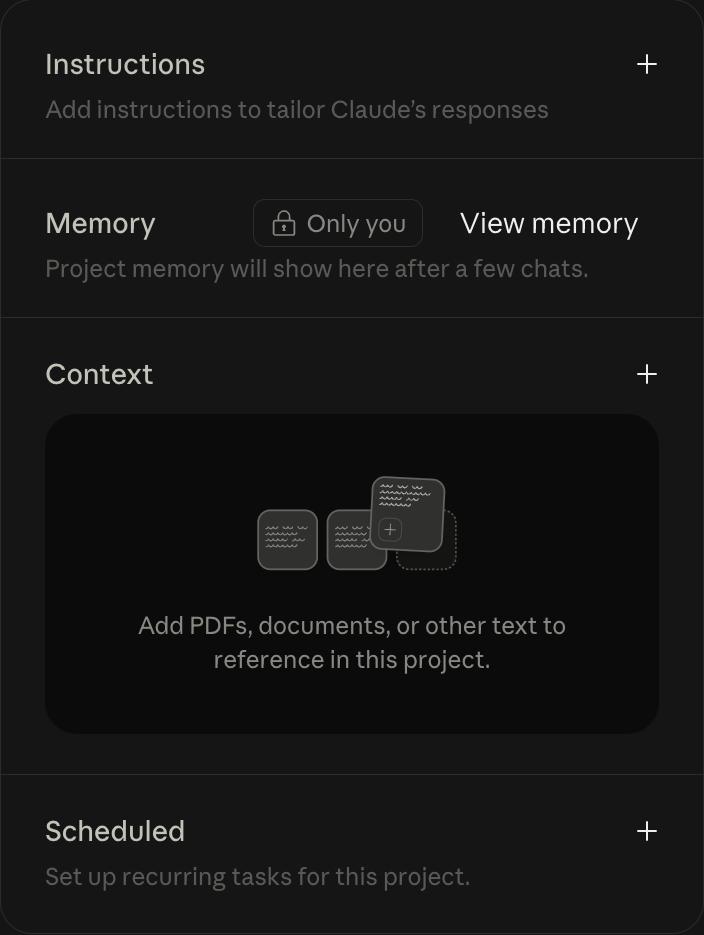
The project page: Instructions and Context on the right, each with a plus.
Each conversation in a project is separate: one can't see what you discussed in another. The only things they all share are the project instructions and files. So if something needs to be remembered everywhere, like a new price or a new rule, add it to the files.
I [what you do, and whether you work alone or with a team]. My clients are [who they are, what language they write in, what they ask about most]. Keep your answers short, in English, and in a friendly tone (or a formal one, if you prefer). If you don't know something about my business, ask me instead of guessing.
For example: "I run a home renovation business with a crew of three. My clients are families who just bought an apartment. They write in English and Hebrew, and they mostly ask about timelines and quotes."
Files to upload:
- Your price list, or a list of your services and products.
- The questions clients ask most, with your answers.
- Two or three messages or posts you've written that you like. That's how the AI learns your style.
You can even use it to keep simple records: add a file with each week's sales and ask it for the totals.
In ChatGPT and Gemini. ChatGPT also has projects on the free plan: go to Projects, create a new one, and add your instructions and files (up to five files for free). Gemini's version is called Gems: you create them at gemini.google.com and give them your own instructions.
8Eight prompts you can copy
Copy one and fill in the brackets.
Here's a message from a client: [paste it, without their name or phone number]. Write a reply that's polite, short, and ends with a clear next step. Give me three versions, from gentle to direct.
Explain briefly and in plain language what's important here, what I need to do, and by when. No more than five points.
Here are my sales for the week: [paste your notes or a photo, without client names]. Put them in a table: date, what I sold, amount. Give me the total and tell me what sells best. Make it an Excel file with a chart.
Write an email to a supplier: [what you need]. Keep it short and professional, and include the date I need an answer by.
Here's a transcript of a call with a client: [paste it, with names replaced]. What did we agree on, who promised what, and by when? Give me a list.
I [who you are and what you sell]. Give me five ideas for posts about my business, one line each. No generic advice.
Help me price [a service or product]. Here are my costs: [paste them]. Show the math step by step.
Turn this into a plan for the week, day by day. Keep it short.
9Where to go from here
Everything in this guide works when you ask. The next step is a system where your numbers, clients and tasks come together in one place on their own, so every morning you can see where your business stands. I build systems like that together with business owners, around how their business actually runs. You can see what it looks like on my second brain page.

About me
Oleg Gitman, Kaimei. I build AI systems together with small business owners: we find where time, money and energy are leaking, and take the repetitive work off your plate.
Take the guide with you
An 11-page PDF. Save it to your phone so you always have it.